
Key Takeaways
- Fresh graduates often need a TIN ID for payroll setup, but the process is straightforward and completely online.
- A TIN ID is essential for tax records, salary processing, and serves as a valid government ID for various purposes.
- If you don’t have a TIN, register on the BIR’s ORUS portal, complete the steps, and generate your Digital TIN ID.
- Employers typically require you to obtain your TIN ID, so prepare your documents ahead of time.
- Common issues include having a duplicate TIN or incorrect RDO assignment, but these can be resolved with proper guidance.
Fresh Grad? Just Got Your First Remote Offer? Start Here.
Graduating is exciting. Landing your first remote job with a global company is even better. And then HR sends you a message asking for your TIN ID, and suddenly, you are Googling things you never thought you would need to know.
If that is where you are right now, you are not alone. Most fresh grads have never had to deal with the BIR before. Up until your first job, there was no real reason to. School did not require it. Internships sometimes did not either. So when your new employer asks for a Tax Identification Number on day one, it can feel confusing at first, especially when no one explains the basics.
The good news is that getting a Digital TIN ID is one of the easier government processes you will go through, and you can do the entire thing from your laptop. No long lines at the BIR, no taking a day off, no asking your tito for help.
It also helps to think of this as part of getting ready for work, not just another government form. As Carla Batan, Penbrothers’ VP of Talent, puts it: “Background verification isn’t optional for most international employers and large Philippine companies. It’s standard protocol. The difference between professionals who sail through this process and those who struggle isn’t luck; it’s preparation.”
This is the starter guide for fresh grads, first-time job seekers, and anyone who is finally getting their TIN because their first remote role needs it.
What Is a TIN ID and Why Do You Need One
A Tax Identification Number, or TIN, is your lifetime taxpayer ID in the Philippines. Your TIN ID is the document that proves you have one. You only get it once, and it stays with you for life across every job you will ever have.
Your employer needs it so they can set up your tax records and payroll properly.
Your salary depends on it. Employers and EORs cannot legally process your pay without a verified TIN. No TIN, no payroll setup, no money in your account.
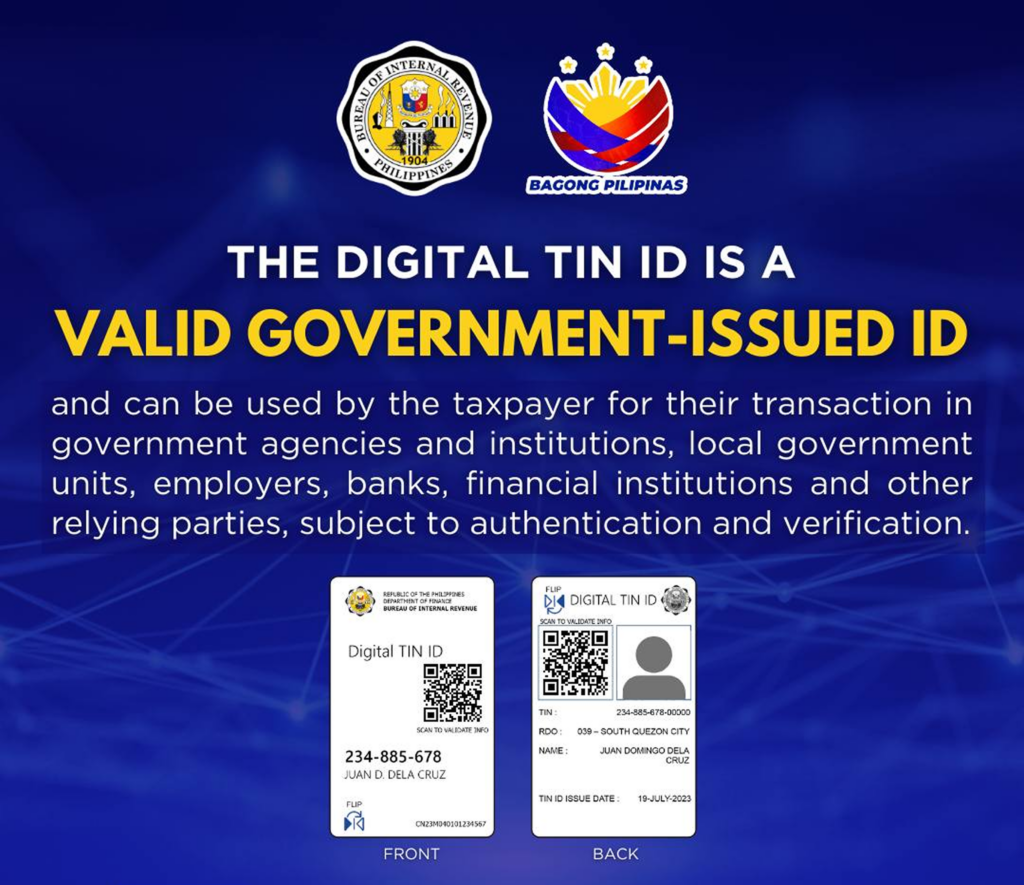
It counts as a primary government ID. Once you have it, you can use it to open your first bank account, register a SIM, or sign contracts. Banks accept the digital version with a scannable QR code; no signature is needed. For a lot of fresh graduates, this is actually one of the first valid IDs they will own as adults.
It helps make sure your tax records are correct from the beginning. Proper withholding starts with a registered TIN. Get this right at job number one and you save yourself from messy paperwork later in your career.
Quick scenario. You just signed with a US startup through an EOR. HR asks for your TIN ID before they can put you on payroll. If you do not have one yet, your start date gets pushed back. A lot of first-time workers only find this out when their employer asks for it.
How to Get Your Digital TIN ID Online (No TIN Yet)
If this is your first time and you have never had a TIN before, this section is for you. The process is fully online through ORUS, the BIR’s digital portal.
Step 1. Go to ORUS.
Head to https://orus.bir.gov.ph. Click New Registration, then Individual, then Create an Account.
Step 2. Select “Without Existing TIN.”
This is the right path for fresh grads and first-time applicants. ORUS will register you as a new taxpayer. You will fill in your personal info, your address, and your employment details from your new job.
Step 3. Verify your email within 24 hours.
ORUS sends a verification link to your email. Click it before it expires or you will have to start the registration over.
Step 4. Generate your Digital TIN ID.
Once your account is active, log back in and click Get Your Digital TIN ID. Upload a 1×1 photo taken within the last six months. White background, no borders, both ears visible, neutral expression, no teeth showing. Basically passport-style.
One important warning. The BIR is strict about photos. Uploading something silly like a cartoon or a photo of your pet carries a ₱10,000 penalty. Save the jokes for your group chat.
Step 5. Download and back it up.
You will get a digital file with a unique QR code. Save it. Back it up to Google Drive or iCloud. Send a copy to your HR or EOR contact, and you are officially set for payroll.
That is it. The whole thing usually takes less than an hour if your details are in order.
What If You Already Have a TIN But Did Not Know
This actually happens more often than you think. If you ever had a paid internship, a part-time job at a coffee shop during college, or any small freelance gig where you got paid through formal payroll, you might already have a TIN. The employer may have registered one for you without making it a big deal.
To check, you can call the BIR Contact Center at 8538-3200 or visit the nearest RDO with a valid ID.
If it turns out you do have one, register on ORUS using With Existing TIN instead. You will need three things ready.
- Your TIN
- Your assigned RDO code (use the BIR’s RDO Finder if you do not know it)
- The email address registered with the BIR
If ORUS gives you an “Email not found” error, that means the BIR does not have your current email on file. Fix this by submitting BIR Form S1905 through the TRRA Portal. It usually syncs in about three working days.
Once your email is recognized, follow the same steps as a new applicant from there.
Will Your New Employer Help You Get One?
Most employers will ask you to get it yourself.
Foreign employers cannot process your TIN for you. They have no authority with the BIR. Local employers and EORs can guide you through it, but the actual application is on you.
This catches a lot of fresh grads off guard. In school, the registrar handled most of your paperwork. At your first job, you are the one filling out the forms. It is one of those work requirements that many fresh grads only learn about when they start applying.
Carla’s advice is to prepare before the offer comes in, not after. “Start building your document portfolio now, not when you need it… Your future self will thank you for the preparation.”
The better EORs do offer real onboarding support, though. At Penbrothers, for example, the Hypercare onboarding team helps new hires verify their RDO status and troubleshoot ORUS issues during their first 30 days. The point is to make sure compliance hiccups do not push back your start date or your first paycheck. That kind of support matters a lot when you are doing this for the first time.
Common Situations Fresh Graduates Run Into
Here are some common issues fresh grads may run into.
You just got your first job offer, and HR is asking for your TIN ID.
Apply for a TIN through ORUS using New Registration and Without Existing TIN. Once your TIN is issued, generate the digital ID and send it to your employer or EOR. Until you do, payroll cannot move forward.
You had a paid internship in college and are not sure if you already have a TIN.
Call the BIR Contact Center first to check. If you do have one, register on ORUS using With Existing TIN. If not, just go the new applicant route.
You moved cities right after graduation (say from your hometown to Manila for the job).
Your RDO needs to match your current address. When you register on ORUS, use your current address, not your school dorm or your parents’ house. Your RDO assignment is based on where you actually live and work.
What Documents Will You Need
Pretty light list, actually. Most fresh grads already have these.
- A valid primary or secondary ID (passport, driver’s license, or PSA birth certificate works fine, and many fresh grads end up using their birth certificate for this)
- Proof of address (used to assign your RDO, can be a recent utility bill or your barangay certificate)
- A 1×1 photo with white background, taken in the last six months
Pro tip. If you do not have a passport or driver’s license yet, your PSA birth certificate is the easiest fallback. You can request one online through PSA Serbilis if you do not have a copy at home.
What If You Lose Your Digital TIN ID
If you lose it, you can get another copy online. Log back in to ORUS and re-download it. Your TIN never changes, and the digital file lives in your account.
If you really need a physical card (some banks still ask for one), you can visit your RDO with a notarized Affidavit of Loss and pay a ₱100 fee. Most fresh grads skip this and just stick with the digital version. It is faster, cleaner, and accepted almost everywhere now.
Is the Digital TIN ID Really a Valid Government ID?
Yes. The BIR Digital TIN ID is officially classified as a primary government ID. For fresh grads who are still building up their list of valid IDs, this is a big deal.
A few things to know.
It does not need a signature. Banks and government offices verify it by scanning the QR code, which pulls up your record straight from the BIR database.
It is accepted for employer onboarding, opening payroll bank accounts, and SIM registration. Three things every fresh grad needs to sort out in their first few months of working.
Some banks or agencies may still ask for a secondary ID just in case. If you do not have many IDs yet, getting your PhilSys (national ID) and a passport early on is a smart move.
Common Problems First-Time Applicants Run Into
Some problems are very common for first-time applicants.
Duplicate TINs. This usually happens when someone forgets they already had a TIN from a college internship and registers again. Having two is technically illegal and carries fines of at least ₱10,000. If you find out later that you already had one, file a consolidation request at your RDO right away.
Wrong RDO assignment. Your RDO is based on where you live and work, not where you went to school or where your family is from. Use your current address when you register.
ORUS will not recognize your email. This only happens if you already had a TIN before. Submit Form S1905 through the TRRA Portal to sync your email with the BIR’s system, wait about three working days, then try ORUS again.
How Long Does the Whole Process Take?
Once your details are complete, you can usually generate your Digital TIN ID through ORUS right away. You hit submit and the file is yours.
The slow parts are usually fixable mistakes. Wrong RDO. Email not synced. Duplicate TIN. Sort those out first and the actual ID generation takes minutes.
Physical replacement cards are a different story. They take weeks if they are even available, and the BIR itself is now nudging everyone toward the digital version anyway.
For first-time remote workers, the digital option is usually more convenient because you can get it online and use it wherever you are.
Your Starter Checklist Before Your First Remote Payday
If you are a fresh graduate about to start your first remote role, get ahead of this now.
- Register on ORUS and apply for your TIN before your first day, or as soon as you can after
- Generate your Digital TIN ID and save a backup to Google Drive or iCloud
- Use your current address so your RDO assignment is correct from the start
- Only share your TIN ID with verified employers, EORs, or platforms
- Keep a list of any other valid IDs you have, since some banks ask for two
Take care of this once, and you will never have to scramble for it again. Your future self, sitting comfortably on your first remote payday, will thank you.
If you are still job hunting and looking for a remote role with a global company that actually walks you through stuff like this during onboarding, check out open jobs at Penbrothers Careers.
Frequently Asked Questions
Yes. If your remote employer, EOR, or local payroll provider asks for a TIN, you need it before they can complete payroll setup. No verified TIN can mean delays in your first salary.
Go to the BIR ORUS portal, choose New Registration, then Individual, then Without Existing TIN. Fill out your details, verify your email, upload a compliant 1×1 photo, and download your Digital TIN ID once approved.
You can still prepare your requirements. Many first-time workers use a PSA birth certificate as a valid document, plus proof of address and a 1×1 white-background photo. Your Digital TIN ID can then become one of your first useful government IDs.
No. A foreign employer usually cannot process your Philippine TIN with the BIR. You need to apply yourself, although an EOR or local onboarding team may guide you through the steps.